Designing a game can be a struggle and a massive challenge to an extent. Between programming, animating, writing, narrative designing, game testing, producing, and project management, it is easy for even experienced teams to get lost in the chaos. There are a lot of moving parts, and if you are not on top of your organization, you are toast. That means staying organized is not only a convenience but also essential for completing projects efficiently.
While tools like Excel, Google Docs, and Trello can help keep track of tasks, they were not built specifically for game development. Game projects have unique needs, such as direct integration with game design documentation, milestones, semantic organization, and task prioritization. Luckily for disorganized (and organized) game developers everywhere, some tools can help. That is where HacknPlan comes in. By 2021, it has already reached 200,000 registered users and over 300 studios subscribed to its premium services. This established it as a well-known and widely used project management tool designed for game developers.
To help you learn more about this tool, this article will provide a thorough HacknPlan review that explores its features, pricing, and more.
What is HacknPlan?
HacknPlan is essentially “Trello for game developers,” but with much deeper features built to cater to the specific workflow of game production. In 2015, it spent months in an open beta mode. It was a productive time for the team behind Hacknplan–the designer scoured forums across the web for feedback. Then, after Version 1.0 was released to the public in 2017, it transformed into a full-fledged game production tool. HacknPlan supports teams of all sizes, from amateurs to indie developers to mid-sized studios.
By definition, HacknPlan works as an SaaS production tool for game development studios. It assists creators in building games through various features that can be used for documenting, evaluating, planning, scheduling, and tracking the development process.
HacknPlan lets you create projects. Once you have a project, you can make task boards that show the tasks you or your team members need to complete.
The tasks bar comes with customizable headings. The stock headings include categories like programming, art, design, writing, marketing, bugs, and more–all categories you’d associate with a game dev project. The headings are customizable, so if you need to tweak them to better fit your project, you can.
Within each heading, there are options for subcategories. These subcategories are also customizable. The programming category includes stock subcategories like:
- Feature
- Physics
- AI
- Documentation
The design category includes subcategories like:
- AI
- Mechanics
- Gameplay
- Level
And again, all of these are customizable.
Creating Tasks in HacknPlan
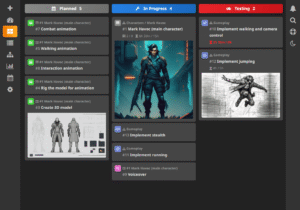
When you create a task, you have a ton of great options.
First of all, you can assign each task to a project. This window defaults to whichever project you’re currently in. But being able to assign tasks to other projects could come in handy if an idea strikes you while you’re working in a different HacknPlan project.
You can give your task a title and also designate its importance (the settings range from “low” to “urgent”). And there’s a space for due dates.
There is an “estimate cost” category, which lets you estimate how long a certain task will take (aptly named). This can be set to different metrics, such as “hours” or “points.” This feature ultimately lets you track how closely you’re following your metrics. You can see how close your estimates are to the time it actually takes.
You can assign users to each task, which lets your team members know who needs to do what. You can also assign tasks to specific categories and subcategories, such as the “gameplay” subcategory of the “design” category.
Tasks can be attached to milestones, too. Milestones are important to project benchmarks you can set to keep your project and your team on track. The milestone feature seems like a way to potentially reduce bottlenecking–your team can see which of their tasks are tied to the important checkpoints in the progress of the game.
You can also assign design elements to tasks. The stock elements include categories like character, level, zone, stage, object, and world. This feature is HacknPlan’s attempt to let you put your game design document into the tool.
A common problem with game design documents is how they’re almost immediately out of date after they’re published. If updates are easy to make to the codex-like GDD in HacknPlan, you might be able to keep it from falling by the wayside.
The task board also includes a description section, in case further explanation or update notations are required.
And finally, you can assign different platforms to tasks–Xbox One, Linux, iOS, etc.
As your team begins their tasks, they can slide their task board from the “planned” overview column to the “in progress” column. There are columns for “testing” and “completed” tasks, as well. These column titles can be changed, and more columns can be added.
The Strengths and Weaknesses
Pros:
- A generous free plan suitable for individuals and small teams
- Customizable boards that adapt to any project structure
- Responsive developer support and an engaged community
- Specifically designed for game development workflows
- Sufficient integration between design documentation and task management
Cons:
- Certain UI elements may take time to get comfortable with
- Higher costs for larger teams or studios
- Steeper learning curve due to feature-rich interface
- The free plan comes with strict limitations on storage
Pricing Structure
HacknPlan offers various pricing to suit different users.
Personal Plan (Ideal for hobbyists)
If you’re a student, a small indie developer, or even just design games as a hobby, the personal plan is for you. With no fees at all, your features are slightly limited compared to the premium plans, but you can still create unlimited game projects. You can also add an unlimited number of users to your projects. One thing the personal plan lacks is attachment storage, which is offered in the two premium plans.
The personal plan gives you the following:
- You can manage projects with no limit in members
- You can join Studio organizations
It’s free, so it’s a great option for getting your feet wet with the tool. If you enjoy it and want to shell out for premium options, HacknPlan has two choices for you.
Personal Plus Plan (Ideal for advanced users)
The personal plus plan costs 7 euros per month. So, if you are only developing projects for a few months out of the year, then the month-to-month plan might make sense. But if you’re going to be developing games and using the tool year-round, you’ll save money with the annual payment option.
The personal plus plan gives you access to four notable features:
- You can customize the tool visuals
- You can integrate with Google, Slack, and GitHub
- You receive priority email support for any issues you encounter
- You get a 50MB max attachment file size, with a 2GB attachment storage cap
Studio Plan (Ideal for professional teams)
The studio package is the priciest of the bunch – 9 euros if you decide to pay monthly. This one is tailored to professional studios that don’t mind paying a little bit extra in order to get access to everything that HacknPlan has to offer. You purchase a single account, which lets you manage the members you invite to your project (and pay for their seats).
The studio version gives you:
- Advanced metrics reporting features
- An attachment file size of 250MB and a max storage size of 5GB per user
Aside from the standard packages, users who prefer to gain extra storage can choose from the following add-ons:
- 250 GB (+10 euros a month)
- 1 TB (+25 euros a month)
- 10 TB (+50 euros a month)
Should You Use HacknPlan in 2025?
If you are a game developer searching for a project management tool that really understands game development workflows, then it becomes a no-brainer — HacknPlan is a strong choice. With its free plan, developers can try task boards, milestones, and design integration. On the other hand, the premium plans open up advanced features for teams managing several projects.
Moreover, this SaaS production tool streamlines game development tools. HacknPlan makes it easier for developers to focus on creating innovative games instead of dealing with unnecessary chaos.
If you are “today years old” when you discovered HacknPlan, there is no need to be shy! It is better late than never, especially when it comes to tools that make things easier for you.

